Most sole traders do not sit down and design a payment system. They take the first job, ask the client to “just send it to my account”, and work it out from there. That is fine for a month or two. After that, slow payers, forgotten references and card fees you never noticed start to add up. If you want to know how to accept payments as a sole trader without losing money or chasing invoices, it helps to understand what each method costs and which ones suit the way you work.
Do you need a business bank account to accept payments?
What the rules actually say
No law says you need one. A sole trader is not a separate legal entity, so the business and the person running it are the same in the eyes of HMRC. Customers can pay into your personal current account, and many card payment providers will happily send payouts there too. The catch sits in the terms and conditions: some personal accounts are not meant for regular trading, and a bank can ask questions if hundreds of small payments start arriving from strangers.
Why most sole traders open one anyway
A separate account turns your bank statement into a ready-made record of the business. Every incoming payment is income, every outgoing one is probably an expense, and you are not scrolling past supermarket shops to find who paid you in March. Many business accounts also come with invoicing, payment requests and a feed into bookkeeping software. If you go down this route, compare the best business bank account options for sole traders on what they charge to receive money, not just on the monthly fee.
Worth checking before you apply: whether incoming transfers are free, whether your card provider can pay out to the account, whether there is a charge for paying in cash, and what ID and proof of address you will need. Many online accounts can be opened the same day.
Ways to accept payments as a sole trader
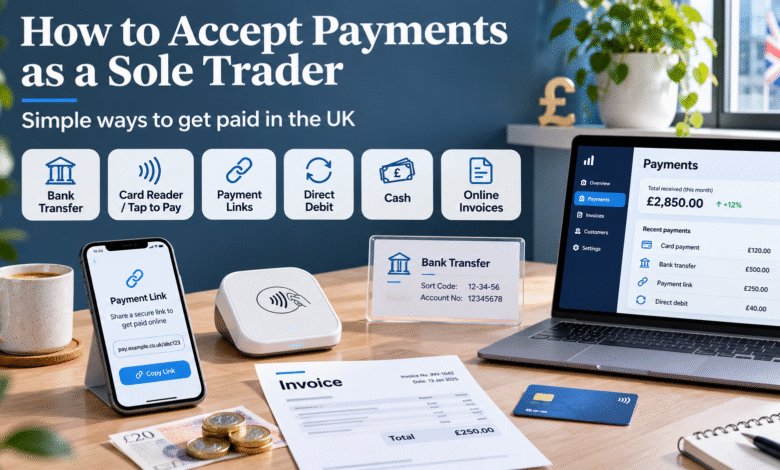
Each method solves a different problem. The aim is not to offer everything, but to make paying you easy for the customers you actually have.
Bank transfer
The simplest option and usually free to receive. Thanks to Faster Payments, a transfer between UK accounts often arrives in seconds. It works best for invoiced work, where the client sits at a desk and pays a batch of suppliers at once. Its weakness is that it depends entirely on the customer acting, so a clear due date and reference on the invoice matter.
Card reader and tap to pay
A pocket-sized reader pairs with your phone and accepts contactless, chip and PIN, and phone wallets. The hardware tends to cost £20 to £50, and pay-as-you-go plans usually have no monthly fee. If you would rather not buy anything, several providers now let a compatible smartphone take contactless payments on its own. This is the natural choice for anyone who is paid on the spot: plumbers, hairdressers, stallholders, personal trainers.
Payment links and online invoices
You create a payment request in an app, send it by text, email or messaging app, and the customer pays by card or bank. No website or checkout is needed. Links suit remote work, deposits for bookings and customers who would never get round to typing in a sort code.
Direct debit
With the customer’s permission, you collect the money from their account on a set date. It takes a few days to arrive, but you stop chasing entirely. It suits anything that repeats: weekly cleaning, monthly coaching, a retainer with a small business.
Cash and cheques
Both are still perfectly acceptable ways to be paid. Cash costs nothing in fees but takes time to count, record and pay in, and some accounts charge for cash deposits. Cheques take several working days to clear. Keep them as a fallback for customers who insist.
How much does it cost to take payments?
The figures below are typical for UK providers on standard plans. Pricing changes often, so check the provider’s current rates before you commit.
| Method | Typical fee | When the money usually arrives |
| Bank transfer | Usually free to receive | Seconds to a couple of hours |
| Card reader or tap to pay | About 1.5% to 2% (often 1.69% to 1.75%) | Next working day |
| Payment link or online invoice | About 1.4% to 2.5%, plus around 25p | Next working day to a few days |
| Card details typed in over the phone | Often 2.75% to 2.95%, plus 25p | Next working day |
| Direct debit | Around 1%, plus a few pence | A few working days after collection |
| Cash | No processing fee, possible deposit charge | When you pay it in |
Why small sales cost more
Headline percentages hide the effect of fixed fees. Take an £8 item paid through a payment link at 1.4% plus 25p: the fee is about 36p, or 4.5% of the sale. The same £8 tapped on a card reader at 1.75% costs 14p. For low-value sales in person, a reader with no fixed fee is usually the cheaper route. For a £600 invoice, the fixed 25p barely registers.
A month of fees, worked through
Imagine a mobile dog groomer with 60 appointments a month at £45 each, so £2,700 in takings. If every client pays on a card reader at 1.75%, fees come to about £47 a month, or roughly £567 a year. If a third of regular clients switch to bank transfer, card fees drop to about £31.50 a month, saving close to £190 a year. Nothing about the service changes, only how people pay.
Good to know: once card takings pass roughly £3,000 to £5,000 a month, ask providers whether a monthly subscription or a custom rate would cost less than pay-as-you-go. Instant payouts are often available too, usually for an extra percentage.
Which payment mix suits your business?
You are paid on site or at events
Lead with a card reader or tap to pay, and keep your bank details on a card or QR code for when the signal drops. Cash as a backup.
You invoice clients for projects
Bank transfer as the default, with a payment link on the same invoice for clients who prefer to pay by card. Ask for a deposit on larger jobs.
You see the same clients every week or month
Direct debit takes the chasing out of it. A standing order set up by the client is a free alternative, but you depend on them to set it up and keep it going.
You sell remotely without a website
Payment links sent over email or messaging apps cover most needs. For phone orders, a virtual terminal lets you key in card details, at a higher fee.
Setting up payments, step by step
- List how your customers prefer to pay. Ask a few regulars rather than guessing.
- Prepare for identity checks. Providers will ask for photo ID and proof of address, and often your Unique Taxpayer Reference (UTR).
- Compare two or three providers. Look at the fee on your typical sale size, any monthly charge, payout speed and which accounts they pay into.
- Run a test payment. Charge yourself or a friend £1 and confirm when and where it lands.
- Update your invoice template. Add bank details, a unique reference, a payment link if you use one and an exact due date rather than “30 days”.
How to get paid on time
Agree terms before you start
Put your payment terms in a quote or short written agreement: how much, when you will invoice, how many days the client has and what happens if they are late. Seven to 30 days is normal. For bigger jobs, a deposit of a quarter or a third up front protects your materials and your time.
Make invoices easy to pay
Send the invoice the day you finish, while the work is fresh in the client’s mind. Offer two ways to pay on the same invoice, such as bank details and a link, so there is no reason to put it off. A polite reminder on the due date gets results more often than a stern one a month later.
When a business client pays late
If your customer is another business, the law is on your side. Under the rules on late commercial payments, you can add interest at 8% above the Bank of England base rate, plus a fixed recovery sum: £40 for debts under £1,000, £70 for £1,000 to £9,999.99 and £100 for £10,000 or more. These rights apply unless your contract sets a different arrangement, and they do not cover sales to members of the public.
For example, on a £2,000 invoice you could claim a £70 fixed sum. If base rate were 4%, interest would run at 12% a year, roughly 66p for every day the invoice stays unpaid.
Tip: mention late payment interest in your terms and on your invoices. Most clients pay well before it comes to that, and a reminder that quotes the rules is often enough.
Tax and record keeping
Report what customers paid, then claim the fees
Your turnover is the full amount customers paid, not what landed after deductions. If a client pays £200 and your provider keeps £3.50, you record £200 as income and £3.50 as an allowable expense. Netting the two off makes your figures harder to check and can understate your income.
Thresholds to keep an eye on
- Self Assessment: you generally need to register once your gross self-employment income goes over £1,000 in a tax year. You can check whether you need to file a tax return if you are unsure.
- Making Tax Digital for Income Tax: it applies from 6 April 2026 to sole traders and landlords with qualifying income above £50,000, and from April 2027 above £30,000.
- VAT: registration is required once taxable turnover passes £90,000 in any rolling 12-month period. How customers pay makes no difference to this.
Keep records that stand up
Save invoices, provider statements and bank statements together, and record cash on the day you receive it. Sole traders should keep records for at least five years after the 31 January submission deadline for the tax year they relate to.
Mistakes that cost sole traders money
- Using one account for everything. It works until you need to prove which payments were business income.
- Choosing a provider on the hardware price. A £10 saving on a reader means little next to an extra 0.3% on every sale.
- Relying on a single method. Readers need charge and signal, links need a working inbox. Have a second option ready.
- Vague invoices. “Payment due in 30 days” with no date or bank details invites delay.
- Ignoring new account limits. Providers can hold payouts or cap volumes on new accounts, so do not plan big supplier payments around money that has not arrived yet.
Frequently asked questions
Can a sole trader accept card payments without a business account?
Yes. Many card payment providers accept sole traders and will pay out to a personal account, although each provider sets its own rules. A business account is not legally required. The main reason to open one is practical: separating business money makes tax returns, expense claims and any questions from HMRC much simpler to deal with.
Can I take business payments into my personal bank account?
You can, because a sole trader and their business are legally the same person. Check your bank’s terms, as some personal accounts are not meant for regular trading. Whatever account you use, keep a clear record of which payments are business income so your Self Assessment figures are accurate and easy to support.
What is the cheapest way to take payments as a sole trader?
Bank transfer is usually free to receive, which makes it the cheapest option for invoiced work. For in-person sales, a card reader on a pay-as-you-go plan with no fixed fee per transaction is normally the lowest-cost choice, typically around 1.5% to 2% of each payment. Compare fees on your typical sale size.
How can I take payments without a website?
Send a payment link or online invoice created in a provider’s app. You share it by email, text or a messaging app, and the customer pays by card or bank without visiting any website of yours. For orders taken over the phone, a virtual terminal lets you enter card details, though it usually costs more per payment.
Do I have to tell HMRC about card payments?
You do not report card payments separately. You report your total self-employed income on your tax return, and card payments are part of that figure, along with transfers and cash. The fees your provider deducts are an allowable expense. Keep provider statements so you can show how your figures were worked out.
This article is general information, not tax or legal advice. Fees, thresholds and rules change, so check current figures with your provider and on GOV.UK.