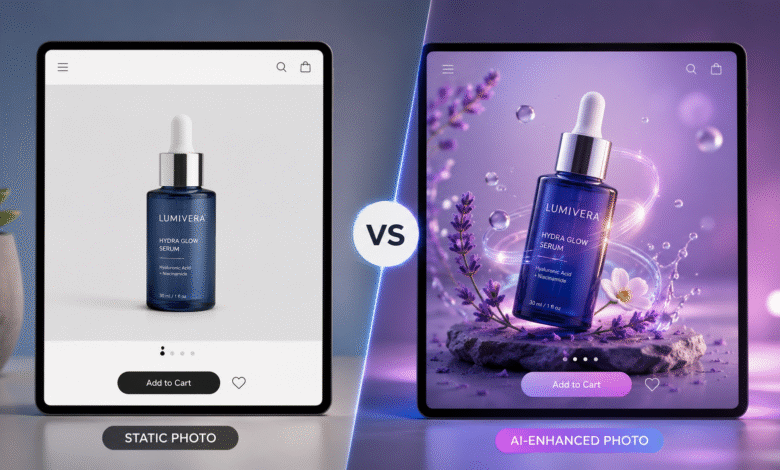
Picture this: a shopper scrolls past your product listing in under two seconds. The image is fine. Clean lighting, decent angle, nothing wrong with it. But it’s also nothing that makes them stop. Meanwhile, three listings down, a competitor’s product is moving — slowly rotating, catching light, drawing the eye just long enough to register. That two-second difference is where a sale is won or lost.
For years, the gap between “product with video” and “product without” came down to budget. Now it doesn’t, and most online sellers haven’t caught up to that fact yet.
Why Most Catalogs Still Run on Still Images Alone
The case for motion content isn’t really up for debate anymore. Shoppers who see a product in action add it to their cart more often, return it less, and spend more time on the page before deciding. None of that is surprising — movement signals real-world context in a way a flat photo can’t.
What’s surprising is how few stores act on it consistently. The reason isn’t ignorance, it’s arithmetic. A single edited product clip eats up half an hour to ninety minutes of an editor’s time. Hire that out and you’re paying anywhere from $25 to $50 per clip. Multiply that across a catalog of three or four hundred SKUs and you’re staring down a budget line that most marketing teams simply don’t have, especially once you factor in reformatting for every platform and refreshing content every season.
So teams triage. The bestsellers get video. Everything else — new arrivals, seasonal lines, the long tail of slow movers — ships with photos alone. Quarter after quarter, that gap between what could be converting and what actually is keeps widening.
The Tool That Quietly Rewrote the Math
What changed isn’t a fancier editing suite. It’s a newer category of software built specifically to take a still product photo and generate motion from it — no studio booking, no camera operator, no editing timeline measured in days.
A platform like ImageToVideoAI reads a product image and produces a short clip, usually somewhere between three and eight seconds, with the kind of camera movement you’d expect from an actual shoot: a slow drift, a touch of parallax separating foreground from background, a gentle zoom. For studio shots, flat-lays, and packaging renders — which make up most of what’s actually in a typical e-commerce catalog — the result holds up. Viewers scrolling a feed aren’t pausing to question whether it was filmed.
That credibility threshold is the whole point. It’s what makes turning an entire catalog into motion content something a small team can actually pull off in an afternoon rather than a quarter.
What Changes Once Video Stops Being Scarce
Triage Disappears
When you can only afford to produce a handful of videos, someone has to decide which products “deserve” one. Once production cost drops near zero, that decision evaporates. Seasonal drops, niche variants, the SKUs nobody bothered with before — they all get the same treatment now.
Testing Actually Becomes a Strategy, Not a Luxury
Paid social rewards volume. A single ad creative on TikTok burns out within days on an active account, and teams that can push out 50 to 80 new variants a week find their winners faster and scale them harder than teams stuck producing a handful. Once batch-generated video removes the production ceiling, testing volume becomes a lever you can actually pull.
Creative Stops Waiting on a Queue
Without a designer or editor in the loop, there’s no handoff, no approval cycle, no waiting for a render slot to open up. The same sitting where someone picks product photos can end with deployment-ready clips.
Putting the Workflow Together
Start with what you already shot. Existing studio photography and flat-lays are the raw material here — no need to commission anything new. Clean backgrounds and decent resolution simply produce sharper output.
Pick a motion style and stick with it. Most platforms offer a handful of presets: gentle drift, parallax depth, slow zoom, light rotation. Applying the same one or two consistently across a product line builds a visual signature shoppers start to recognize.
Run it as a batch, not one at a time. This is the step that actually changes the unit economics. A few hundred images that would’ve taken weeks to edit can move through in a few hours instead.
Export for wherever it’s going. TikTok and Reels want 9:16. Feed posts want 1:1. Pre-roll wants 16:9. Letting the export presets handle this saves a separate resizing pass for every placement.
Where the Format Earns the Most
Beauty and skincare lean heavily on texture and finish, qualities that flat photos struggle to convey. Motion fixes that, and it slots neatly into TikTok Spark Ads, the category’s biggest reach channel.
Apparel photographed flat gains real dimension once parallax is applied — close enough to a produced campaign shoot that it holds up in a 9:16 Reel without extra styling work.
Electronics benefit from a slow rotation or feature callout, which performs well in Amazon’s A+ content sections where longer dwell time tends to track with higher conversion.
Home goods photographed with a soft camera drift can read like editorial content — a single well-composed lifestyle shot doing the work of an entire campaign asset.
A Few Things That Separate Good Output From Forgettable Output
Keep the motion subtle. The product should hold attention, not the camera trick. Overdone effects read as “someone was showing off the software,” which isn’t the impression you want at the point of purchase.
Match the energy to where it’s landing. A slow, cinematic parallax fits a product page where someone’s already engaged. The same clip might fall flat in a fast-scrolling feed that rewards more visible motion.
And protect the photography you started with. AI motion amplifies whatever’s already there — sharp, well-lit images get sharper results, while soft focus or cluttered backgrounds just get scaled up alongside everything else. Good source photos remain the foundation no matter how good the tool is.
Common Questions
Will these clips pass platform content rules?
Motion generated from your own product photography generally clears content guidelines on Amazon, TikTok, and Meta. Policies shift periodically, so it’s worth a quick check before a large rollout.
Do I need editing experience to use this?
Barely any. The actual decisions — which image to use, which preset fits, whether the output looks right — take minutes, not a production background.
What if my product photos aren’t great to begin with?
Fix the photos first. No motion tool repairs bad lighting or a messy background; it just makes the flaw more visible at scale.
How long do the generated clips usually run?
Most AI image-to-video tools output clips in the three-to-eight-second range, which happens to be exactly the length that performs best in social ads, product pages, and marketplace listings.
The Bottom Line
Video used to be the thing only your top sellers could justify. That constraint is gone. The brands treating motion as a default setting across their entire catalog — not a reward reserved for bestsellers — are the ones quietly pulling ahead right now, and the gap they’re building gets harder to close every month it continues. The only real question left is whether your workflow has caught up to what’s now possible.